Pick a photo
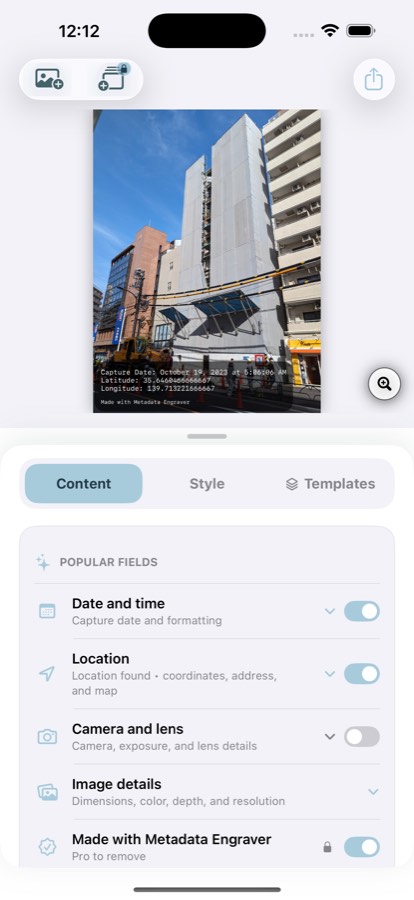
Metadata Engraver reads what the camera already wrote — capture time, coordinates, lens, exposure. Nothing to type.
On-device photo documentation
Every photo already knows when and where it was taken. Metadata Engraver puts that on the image itself — date, GPS, address, camera settings — so the record survives the screenshot, the email and the group chat.
iPhone and iPad · Free to try · Pro from $2.99/month
Three taps
Job sites, inspections, insurance claims, real estate, field research. Anywhere a picture on its own isn't enough.
Metadata Engraver reads what the camera already wrote — capture time, coordinates, lens, exposure. Nothing to type.
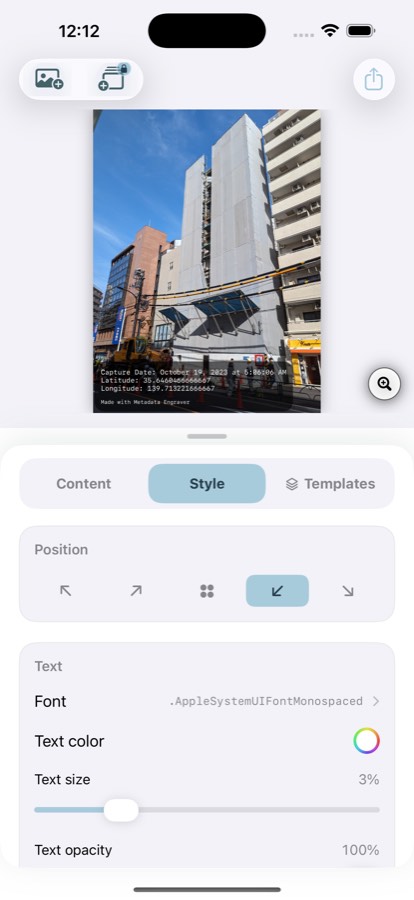
Toggle the fields that matter, then set font, colour, position, backdrop and opacity until it reads at a glance.
The stamp is part of the image. Send it anywhere and the record travels with it — no sidecar file, no database.
What gets stamped
Turn on only what the job needs. Location fields appear when the photo carries GPS.
Templates & batch
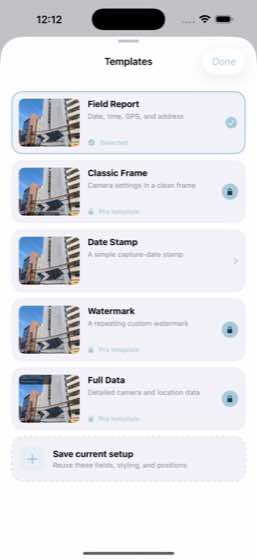
Save a layout once and apply it across a whole shoot. Each photo keeps its own metadata — only the design is shared.
Images are read, stamped and exported entirely on your iPhone. When you ask for an address or a map inset, only the coordinates already inside the photo go to Apple Maps — never the picture. No account, no analytics SDK, no tracking.
Pricing
Pro unlocks every template, automatic addresses, custom branding, unlimited saved templates, batch stamping and removal of the Metadata Engraver credit.
$2.99 /month
Auto-renewing. Cancel any time from your Apple Account.
$19.99 /year
Auto-renewing, with a 3-day free trial for eligible users.
$34.99 once
A single purchase. Every Pro feature, no renewal.